LetzAI Enterprise is built for studios, agencies, corporate creative teams, and developer platforms that need shared billing, governed access, and production-grade AI workflows. Every Enterprise plan combines Organizations, a shared credit pool, the Model Training API, enterprise-grade model access, and centralized administration.
What's included in every Enterprise plan
- Organizations — invite team members, assign roles, and manage billing and a shared credit pool from one dashboard.
- All Creator features — image and video generation, editing, upscaling, Character Studio, AI Chat, Canvas, and the community feed.
- Enterprise-grade models — licensed access to organization-scoped models and professional workflows, including Seedance 2.0 Enterprise and Seedance 2.5 Enterprise.
- IP whitelisting — eligible organizations can submit authorised intellectual property and public-figure likeness rights for manual clearance.
- Shared models — keep custom @-handle models private to your organization or share them with the community.
- Model Training API — programmatically create, manage, update, and rethumbnail models from your own systems.
- Bring Your Own Keys — save your organization's own OpenAI, Anthropic, Google, xAI, FAL.ai, BytePlus or inference.sh API keys, and every model those providers run costs 0 credits for your team.
- Centralized administration — manage seats, credits, billing, model sharing, and organization settings in one place.
- Priority support — Enterprise organization administrators get priority handling for technical, billing, access, and platform questions.
- Unlimited asset storage — retain your generated and uploaded assets without a plan storage cap.
Seedance Enterprise (2.0 & 2.5)
Seedance Enterprise is ByteDance's professional Seedance Studio workflow for LetzAI Organizations. It combines cinematic video generation, synchronized native audio, multimodal references, and organization-scoped asset-library access.
Two Enterprise variants are available:
- Seedance 2.0 Enterprise — up to 15-second clips, resolutions through 4K, and up to 12 multimodal references (9 images / 3 videos / 3 audio).
- Seedance 2.5 Enterprise — up to 30-second clips, 480p/720p/1080p, and up to 50 multimodal references (30 images / 10 videos / 10 audio), plus the same Enterprise rights workflows for real people, IPs, and mature content.
Production capabilities
- Native synchronized audio on every generation.
- Text-to-video, image-to-video, and reference-to-video through one workflow.
- First and last frame control for more deliberate shot transitions.
- Aspect ratios including 21:9, 16:9, 4:3, 1:1, 3:4, and 9:16.
- Organization-scoped routing — Enterprise jobs are validated against your organization and isolated through an organization-specific safety identifier.
Standard Seedance models remain available for general use. The Enterprise variants are intended for governed organization workflows: private asset-library namespacing, licensed enterprise access, and approved IP or likeness use. Switch into your organization from the org switcher before selecting Seedance 2.0 Enterprise or Seedance 2.5 Enterprise.
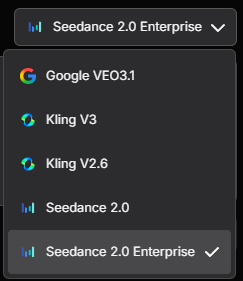
Seedance Enterprise is available while working in an eligible organization context.
Copyright clearance and IP whitelisting
Organizations can request manual clearance for authorised copyrighted IP and public-figure likeness rights. This workflow helps rights holders, agencies, and authorised partners document permission before using protected subjects with Seedance 2.0 Enterprise or Seedance 2.5 Enterprise.
- IP Copyright — for copyrighted characters, brands, or other protected intellectual property that your organization owns or is authorised to use.
- Artiste Likeness Rights — for a public figure represented by your organization or covered by a valid third-party authorisation.
- Guided documentation — download the applicable BytePlus authorisation templates and attach proof of ownership or permission.
- Platform undertaking — LetzAI prepares the Platform Letter of Undertaking for BytePlus from your submission; your organization does not complete that document itself.
- Manual review — submission does not guarantee approval. Only authorised materials within the supported clearance categories are eligible.
Open your organization and choose Copyright Clearance to select a clearance type, download the matching templates, and submit your signed materials for review.
Bring Your Own Keys
If your organization already pays a model provider directly, you can use that contract inside LetzAI. Save the provider's API key in your organization's settings under Bring Your Own Keys, and every model that provider serves on LetzAI runs on your key instead of the shared credit pool. Studio, Chat and Canvas work exactly as before; the job simply costs 0 credits and shows up on your provider's invoice.
- Supported providers — OpenAI, Anthropic, Google Gemini, xAI, FAL.ai, BytePlus and our core Inference provider: Inference Shell. The settings page lists exactly which models each key covers.
- Text and media — covers the Claude, GPT, Grok and Gemini models behind Chat and Canvas as well as image, video and upscale models.
- Organization-only — while a member works inside the organization, only the organization's keys are used. Members' personal keys are never consulted, and members do not need their own provider accounts.
- Admin-managed — only organization admins can view, pause, replace or delete keys. Saved keys are always shown masked.
- 1-credit hold — LetzAI reserves 1 credit when a job starts and refunds it once the job finishes on your key, so the shared pool needs at least one credit available.
Open your organization, choose the Bring Your Own Keys tab, paste the key into the provider's slot and press Save key. The full guide is at Bring Your Own Keys.
Plans and pricing
Yearly billing gives you two months free compared with paying monthly.
| Enterprise Basic | Enterprise Plus | Enterprise Custom | |
|---|---|---|---|
| Price | 500€ / month 416.67€ / month5,000€ billed yearly | 1,500€ / month 1,250€ / month15,000€ billed yearly | Custom quote |
| Team seats | 10 | 30 | Unlimited |
| Monthly credits | 200,000 | 750,000 | Custom arrangement |
| Per 1,000 credits | 2.50€ 2.08€ | 2.00€ 1.67€ | Custom |
| Best for | Small studios | Larger agencies | Tailored deployments |
Every plan includes: all Creator features, enterprise-grade model access, IP whitelisting requests, the Model Training API, Bring Your Own Keys, shared credits, centralized administration, priority support, and unlimited asset storage.
Plus adds a dedicated account manager and a lower rate per credit. Custom can add SSO or IAM, custom onboarding, unlimited sub-users in your own application, and billing by invoice.
Enterprise top-ups
Top-ups are one-time purchases for an active Enterprise subscription and do not expire. Larger purchases have a lower effective price per credit.
| Top-up | Credits | One-time price | Per 1,000 credits | Saving per credit* |
|---|---|---|---|---|
| Small | 500,000 | 625€ | 1.25€ | 50% cheaper |
| Medium | 2,500,000 | 3,000€ | 1.20€ | 52% cheaper |
| Large | 4,250,000 | 5,000€ | 1.18€ | 53% cheaper |
*Compared with the Enterprise Basic monthly rate of 2.50€ per 1,000 credits. The Large tier has the lowest effective top-up rate.
See live plan comparisons and enterprise top-ups
Working with Organizations
An Organization is your team's shared LetzAI workspace. Create an organization, activate an Enterprise plan, invite members, and use the org switcher to choose whether a generation uses your personal credits or the organization's shared pool.
Shared and private models
Custom @-handle models can remain private to their owner, be shared only with organization members, or be published to the community. Organization sharing makes approved models easy for the whole team to find while preserving the chosen visibility level.
Model Training API
The Model Training API exposes LetzAI's model-creation pipeline for catalog-scale and automated workflows.
- Create models with
POST /models, including name, privacy, class, training images, and an optional completion webhook. - Update, delete, or rethumbnail models with the corresponding REST endpoints.
- Control model visibility and metadata from your own systems.
See the API Documentation for the complete reference.
Get started
Create an organization to subscribe to Enterprise Basic or Plus, or contact our team for a tailored Enterprise Custom plan.
Go to Organizations Contact our team